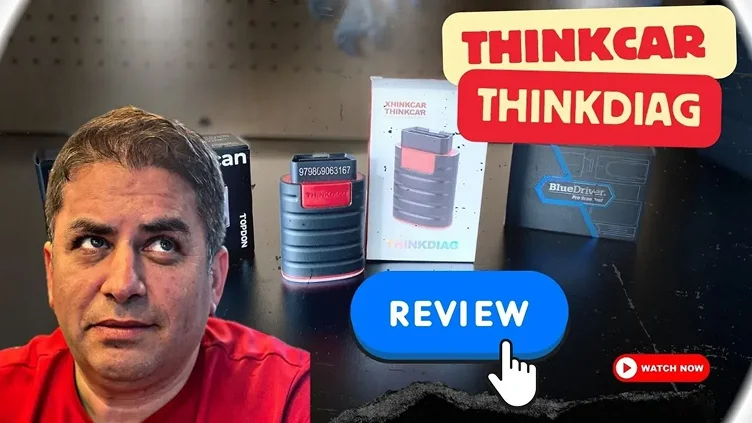
If you’re someone who enjoys working on your car or needs to troubleshoot issues without spending a fortune at the mechanic, a scan tool can be a game changer. Today, we’ll dive into the ThinkDiag Bluetooth OBD2 Scan Tool, an app-based device that promises to bring professional-level diagnostics to your fingertips. In this review, I’ll share my hands-on experience using this tool, its features, benefits, and some things you should know.
Watch the full video HERE.
What is the ThinkDiag Bluetooth OBD2 Scan Tool?
The ThinkDiag is a compact, Bluetooth-enabled OBD2 scanner that pairs with your smartphone or tablet. It works with both Android and Apple devices, making it accessible for most car owners. This scan tool is compatible with vehicles made in 1996 or later, as these vehicles are required to be OBD2-compliant. Unlike traditional, larger, and more expensive scan tools, ThinkDiag promises to provide many of the same functions in a much more portable and budget-friendly form.
Inside the package, you’ll find the Bluetooth OBD2 device itself, which plugs into your car’s OBD2 port (usually located beneath the dashboard near the driver’s seat). Once connected, you’ll be able to use an app on your phone to interact with the vehicle’s systems, read diagnostic codes, and even perform special functions such as resetting maintenance lights or testing individual components.
Features of the ThinkDiag Scan Tool
- Compatibility and Ease of Use
The ThinkDiag works with cars from 1996 onward, so it covers a broad range of vehicles. The setup process is incredibly straightforward. After plugging the device into your car’s OBD2 port, the Bluetooth connection is established, and you simply need to open the ThinkDiag app on your phone. Once the app is launched, you’re prompted to register with an email address, and then you’re ready to start scanning. - Diagnostics and Hot Functions
ThinkDiag offers 15 hot functions (special services) that cover a wide range of systems in your vehicle. These include:- Engine control
- ABS (Anti-lock braking system)
- SRS (Airbag system)
- TPMS (Tire Pressure Monitoring System)
- Transmission control
- Throttle body
- Oil reset
- Battery registration (important for modern vehicles)
- The tool also supports advanced diagnostics for specific issues, such as reading live data, clearing fault codes, and performing bidirectional tests. For example, you can use the ThinkDiag to activate specific components like the fuel pump or rear windshield wipers to help troubleshoot problems.
- Bidirectional Testing
One of the most impressive features of the ThinkDiag is its bidirectional control, which allows you to send commands to the vehicle to test specific parts. For instance, if your car’s rear wiper is malfunctioning, the ThinkDiag can help determine if the problem lies with the wiper motor or the button on the dash. This kind of function is typically found in more expensive, professional-grade scan tools. - Customizable and Advanced Functions
You can also customize certain vehicle settings, such as the delay time for headlights or the volume of warning sounds. Special functions like key programming or injector coding may also be available, but these are not universal across all vehicle makes and models. - Graphing and Data Monitoring
ThinkDiag also includes graphing capabilities for monitoring live data, such as engine performance, sensor readings, and more. This is particularly helpful for diagnosing intermittent issues that may not always trigger a fault code. - Maintenance Functions and Reports
The app offers easy access to various maintenance-related features, such as resetting oil change lights or registering a new battery. After scanning, you can generate detailed diagnostic reports, which include information like the vehicle’s VIN, fault codes, and even the time of the scan. These reports can be shared, which is especially useful if you need to show them to a mechanic. - Subscription and Updates
After purchasing the ThinkDiag, you get one year of free updates, with the option to renew for about $50 per year. This is a good deal, especially since regular updates ensure the tool remains compatible with the latest vehicles and systems.
What’s the Catch?
While the ThinkDiag offers a wide range of functions and is impressive for an app-based tool, there are a few limitations to keep in mind:
- Permanent Codes and Inspection Monitors
One area where the ThinkDiag falls short is in reading permanent diagnostic codes. Some vehicles store permanent fault codes that cannot be deleted until the issue is fixed. These codes are important, especially if you’re trying to pass a smog or emissions test. Unfortunately, the ThinkDiag doesn’t provide clear data on these codes, which could be a major drawback for users relying on this tool for smog testing or emission repairs. - App-Based Limitations
As convenient as it is to use your smartphone as the interface, app-based scan tools like the ThinkDiag can be frustrating when it comes to viewing complex data or graphs on a small screen. It’s not always the easiest to interact with, especially if you prefer the tactile experience of a traditional scan tool with a larger display. - Reliability Issues
Like many app-based tools, there can occasionally be connectivity issues. In my testing, I had to reset the device a few times due to connectivity errors, though this isn’t a dealbreaker. It’s just something to be mindful of, especially if you’re using the tool in cold or challenging conditions. - Advanced Functions May Not Apply
Not all special functions will apply to every vehicle. While 15 functions are listed, only certain ones will be available based on your car’s make and model. For example, if you don’t own a diesel vehicle, you won’t need the injector coding feature.
Final Thoughts: Is the ThinkDiag Right for You?
Overall, the ThinkDiag Bluetooth OBD2 Scan Tool is an excellent option for DIYers, car enthusiasts, and anyone who needs a convenient, affordable way to diagnose vehicle issues. The range of supported functions, especially the bidirectional testing, is impressive for an app-based tool. It’s fast, easy to use, and offers a wealth of diagnostic features that make it suitable for most vehicles.
However, if you’re dealing with a lot of permanent codes or need detailed emissions data for smog tests, you may want to consider a more traditional scan tool. Also, if you’re someone who prefers the experience of using a larger, standalone device instead of your phone, this tool may not be the best fit.
Rating: 8/10
For the price and functionality, the ThinkDiag is an outstanding tool. It’s not perfect, but it’s a fantastic choice for anyone looking to save money on car repairs or just get a better understanding of their vehicle’s health. Just make sure you have a backup vehicle or plan in place if you’re relying on it for advanced tasks!
Pros:
- Affordable, app-based design
- Bidirectional functions for advanced testing
- Broad vehicle compatibility
- Supports many maintenance functions and advanced diagnostics
- Graphing and live data monitoring
Cons:
- Permanent diagnostic code limitations
- Small screen and app interface may be frustrating
- Occasional connectivity issues