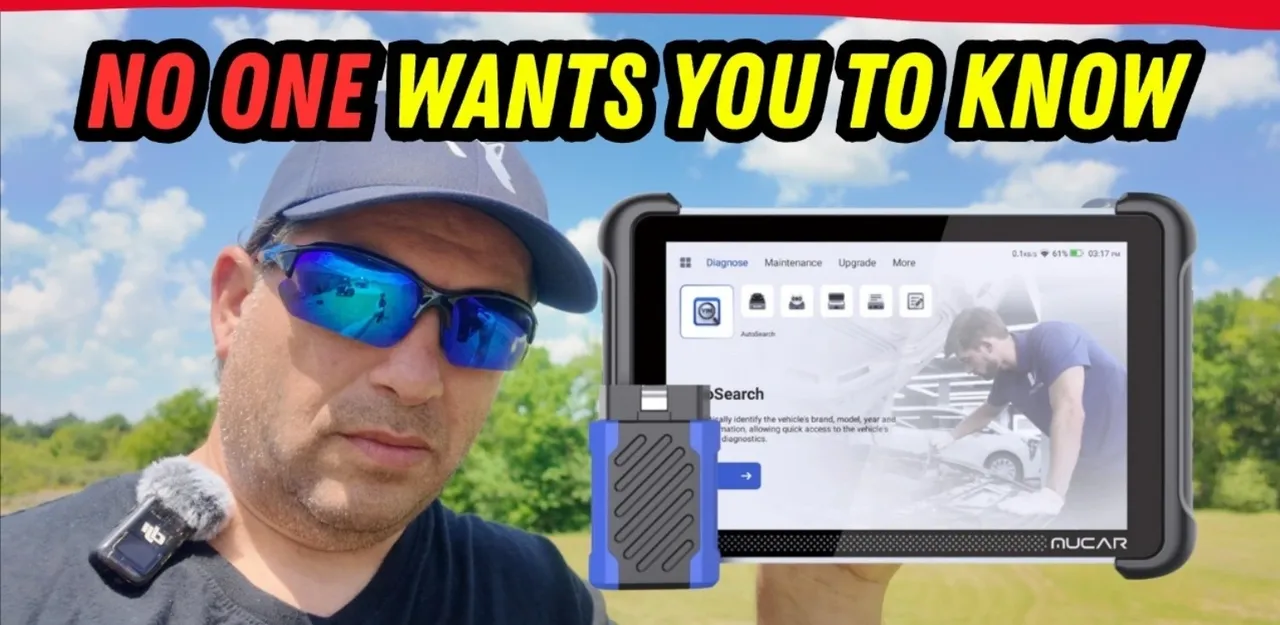
In 2025, a scan tool needs to offer more than just basic code reading. For many, the only reasons to pay over $200 for a scan tool are if it’s bi-directional, offers lifetime updates, and, most importantly, provides AI assistance. The Mucar 892 BT claims to tick all these boxes. Let’s dive in and see if it lives up to the hype!
A New Era of Scan Tools: Lifetime Updates and AI
For years, owning a scan tool meant a slow bleed of yearly subscription fees. However, about a year ago, companies like Thinkcar and Mukar revolutionized the industry by offering lifetime updates. This change has been a huge hit with users, eliminating those recurring costs. The Mucar 892 BT, new for 2025, takes this a step further by integrating AI assistance, a feature that promises to change how we diagnose vehicle issues.
Unboxing the Mukar 892 BT: What’s Included?
The Mukar 892 BT comes in a branded soft-shell case and includes everything you need:
- Ethernet cable and USB-to-Ethernet adapter: Essential for DOIP (Diagnostics over Internet Protocol) support on newer vehicles.
- DOIP adapter dongle: Allows for a wired connection to vehicles requiring DOIP.
- USB-C cable: For charging and data transfer.
- Power brick with multiple tips: Compatible with various regional outlets (US, UK, EU).
One of the standout features of Mukar/Thinkcar units is their hassle-free registration. Simply connect to the internet, and you’re ready to go—no logins or passwords required, thanks to the included lifetime updates. This alone represents significant long-term savings, potentially thousands of dollars over several years compared to tools with annual fees.
First Look: Hardware and Design
The Mukar 892 BT features a good-sized display and a well-designed kickstand that can prop the unit up or even hang over a steering wheel. Its Vehicle Communication Interface (VCI) is completely wireless via Bluetooth, allowing you to work comfortably away from the vehicle, a huge plus in extreme weather conditions. The VCI snaps securely into place with a strong magnet, ensuring it stays put.
The tablet itself boasts a USB-C input for charging, a regular USB connection for accessories (like the DOIP adapter), and a power button with simple shut down and restart options. The battery life is impressive, with the unit holding a charge for extended periods.
User Interface and Key Features
The Mucar 892 BT’s user interface is clean, intuitive, and easy to navigate. After a major update released on April 25th, the device gained several new features, including the much-anticipated AI capabilities.
The main menu is organized into four categories: Diagnose, Maintenance, Upgrade, and More.
- Diagnose: This section offers auto-search functionality for VIN decoding, which has been reliable across tested vehicles. You can access OE (Original Equipment) specific data, providing much more detail than generic OBD2 readers. There’s also basic OBD2 access, a history report, feedback submission, and access to the “Dollar Fix community,” a free social media platform for car enthusiasts.
- Maintenance: This view, set as default, offers 34 different special functions, though not all apply to every vehicle (e.g., DPF regeneration for diesels).
- Upgrade: This is where you can easily update the software via Wi-Fi. All available software updates can be installed, leaving approximately 42GB of storage free after installation.
- More: This section includes settings, online services, a user manual, an OBD2 fault library, and a coverage list (though the coverage list is online, not local). It also lists optional modules like TPMS, videocopes, oscilloscopes, printers, and battery testers that can be acquired separately.
A nice customization feature allows you to change the background image of the interface.
The AI Assistance: A Glimpse into the Future
The Mucar 892 BT’s most talked-about feature is its MU AI Assistance. This isn’t just an icon; it integrates directly into the diagnostic process. When a trouble code is found, the AI option automatically appears, offering potential solutions.
In testing, the AI’s effectiveness varied. On a Toyota with a triggered check engine light, the AI’s suggestions were generic and not particularly helpful. However, when tested on a Mercedes with an airbag light, the AI provided more relevant information. This suggests the AI is still in beta and evolving, but its mere presence is a promising step forward for DIY users.
Beyond AI, there’s also human support available through online services, with questions typically answered within 24 hours.
OE Data vs. Generic OBD2: Why It Matters
The true value of a scan tool like the Mucar 892 BT lies in its ability to access OE (Original Equipment) manufacturer-specific data. While generic OBD2 readers provide basic codes (like P300 for a random misfire), the Mucar 892 BT can decode VINs and access detailed information from all vehicle modules, much like a dealership’s specialized software.
For example, a health report can scan all vehicle modules to identify any Diagnostic Trouble Codes (DTCs). Users can then delve into specific modules, like the Engine Control Module (ECM), to:
- Read and clear fault codes.
- Read freeze frame data (conditions when the problem occurred).
- Access hundreds of data stream parameters (compared to dozens on basic readers).
- Perform actuation tests (bi-directional functions) to control components like the engine fan.
- Utilize special functions such as smog inspection readiness checks, ECU resets, and EVAP system checks.
- Perform ECU coding to customize vehicle settings, such as door lock behavior or back door operation.
Bi-Directional Control and Key Making
The Mucar 892 BT’s bi-directional capabilities are a significant advantage. This allows the tool to not only read codes but also send commands to the vehicle, enabling you to test components without disassembly (e.g., locking/unlocking doors from the body control module).
Another impressive feature is the key making option. Unlike many manufacturers that lock users out of this function, Mucar allows you to program new keys, even for “all keys lost” scenarios. This can save users hundreds of dollars on dealership fees.
The tool also supports 34 different functions, including:
- Throttle body reprogramming
- Diesel particulate filter (DPF) regeneration
- Odometer and oil resets
- Steering wheel angle sensor and TPMS functions (requires optional module)
- Window calibration
- Disabling start/stop features
- NOx and AdBlue resets
- Airbag resets
Live Data, Graphing, and More
The Mucar 892 BT excels at live data streaming and graphing. It can pull up hundreds of data fields and graph them for in-depth analysis. The ability to record data while driving is particularly useful for diagnosing intermittent issues. The tool also remembers previously selected data streams, allowing for quick comparisons.
Limitations to Consider
While impressive, the Mucar 892 BT isn’t perfect. It lacks:
- Topology: A visual representation of module locations, which can be helpful on newer vehicles with numerous computers.
- Built-in camera: Unlike some higher-end units, it doesn’t have an integrated camera.
Randomfix Tool Grade and Final Thoughts
The Mucar 892 BT is a game-changer for both DIY home mechanics and professional mechanics. It earns high praise for its lifetime updates, bi-directional capabilities, and the promising integration of AI assistance. While the AI is still in its early stages, the overall value proposition is undeniable.
For professionals, this tool can serve as an excellent backup scan tool, especially given its low maintenance cost due to free lifetime updates. For home users, the savings on yearly fees and the ability to perform advanced diagnostics and even make keys make it an incredibly valuable investment that can pay for itself after just one or two uses.
The Mucar 892 BT is highly recommended for anyone looking for a powerful, cost-effective scan tool that can handle a wide range of diagnostic and programming tasks.
Have you tried the Mucar 892 BT or another scan tool with AI features? Share your thoughts in the comments below!
Watch the full video review HERE.
▶️▶️ Purchase direct Link to scan tool I showed in the video https://shrsl.com/4vc0r use discount code ” RANDOMFIX ” for 10% off
▶️ Link to scan tool I showed in the video https://shrsl.com/4vc0r use discount code ” RANDOMFIX ” for 10% off
▶️ Pre-Update video for Mucar 892BT https://youtu.be/75S9axABfL8
▶️ Mucar 892 BT Update installed Video https://youtu.be/bkmDOHjnXWA
▶️ Bypass cables video for FCA vehicles https://youtu.be/uVVCs_zENxI
▶️ Identical clone – ThinkCar 689BT Review – Same as this unit but not Ai support of now https://youtu.be/hE6pRJ6n9M4